
Analytics platforms are good at telling you what happened on your site and surprisingly bad at telling you where the visitor came from. When a report shows a large block of traffic labelled as direct, the usual cause is not people typing your address by hand. It is links that were shared without tracking tags, so the analytics tool had nothing to attribute and fell back on its default bucket.
UTM parameters fix this. They are short pieces of text appended to a URL that tell your analytics platform exactly which campaign, channel and placement a click came from. This guide covers the five parameters, the naming rules that keep reports readable months later, and the mistakes that quietly corrupt data without anyone noticing.
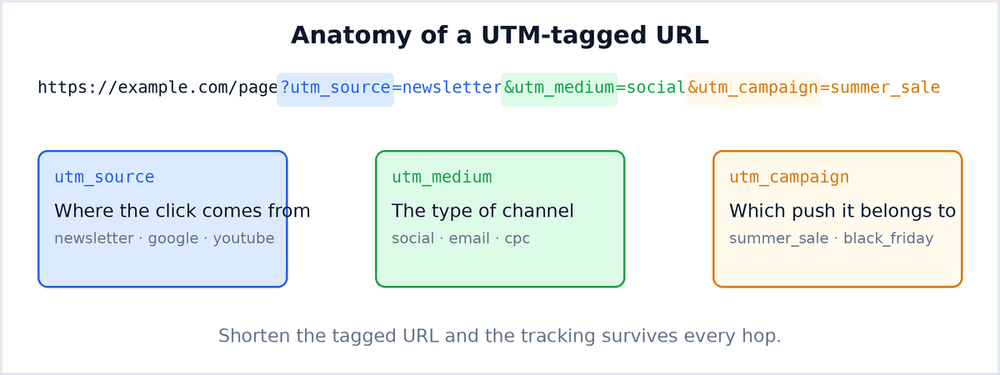
The Five Parameters
- utm_source identifies where the traffic came from, such as
newsletter,facebookorpartner-blog. This is the field you will group by most often. - utm_medium describes the channel type, such as
email,social,cpcorqr. It sits one level above the source and lets you compare email performance as a whole. - utm_campaign names the specific effort, such as
spring-saleorproduct-launch. It is what ties several links together into one initiative. - utm_term is optional and mostly used for paid search keywords. For organic and social work it is usually left empty.
- utm_content is optional and distinguishes two links inside the same campaign, for example a header button and a footer button in one email.
Only the first three matter for most people. If you tag nothing else, tag source, medium and campaign, and your reports will already be dramatically more useful.
What a Tagged Link Looks Like
A complete tagged address follows a predictable pattern. The first parameter is introduced with a question mark and every one after it is joined with an ampersand.
https://example.com/pricing?utm_source=newsletter&utm_medium=email&utm_campaign=spring-sale&utm_content=header-button
Parameter order does not matter to analytics tools, but spelling does. Every character in these values becomes a row in your reports, so a typo creates a new category rather than matching an existing one.
Naming Rules That Save You Later
- Use lowercase everywhere. Analytics tools treat values as case sensitive, so
Newsletterandnewsletterappear as two separate sources and your numbers split in half. - Use hyphens instead of spaces. A space becomes
%20in the address, which is unreadable in reports and easy to mistype. - Pick one word per concept and never vary it. Decide whether the channel is
socialorsocial-media, then hold that choice for years. - Keep a shared spreadsheet of campaigns. It is the only reliable way to stay consistent when several people build links.
- Write the values as if someone else will read the report. Codes that make sense to you today are meaningless to a colleague next quarter.
Building Tagged URLs Without Breaking Them
Hand assembling long addresses is where most errors enter. A few habits remove nearly all of them.
- Build one master URL per campaign and copy it, changing only the parameter that differs.
- Shorten the final tagged URL. A long address with four parameters is unwieldy in an email and looks suspicious to recipients. A short link hides the complexity and keeps tracking intact.
- Click every link once before sending. A single missing ampersand can drop a parameter entirely.
- Store the short link and the tagged destination together. When you review results later, you will want to know which parameters each short link carried.
Mistakes That Quietly Ruin the Data
- Tagging internal links. UTM parameters overwrite the original attribution, so tagging links inside your own site will credit the wrong channel for traffic that had already arrived.
- Inconsistent capitalisation. By far the most common cause of messy reports, and almost invisible until you compare two months of data.
- Omitting utm_medium. Without it, email and social traffic often collapse into a generic bucket that cannot be separated later.
- Tagging links shared in person or by word of mouth. There is nothing to track, and the extra text makes the address harder to read for no benefit.
- Changing the naming scheme mid campaign. Half the clicks land in one category and half in another, and no amount of filtering will merge them cleanly.
Templates for Common Channels
Starting from a consistent template removes most of the thinking. Adjust the values, keep the structure.
- Email newsletter.
utm_source=newsletter&utm_medium=email&utm_campaign=monthly-digest - Organic social post.
utm_source=linkedin&utm_medium=social&utm_campaign=product-launch - Paid search.
utm_source=google&utm_medium=cpc&utm_campaign=brand-terms&utm_term=url-shortener - Printed QR code.
utm_source=flyer&utm_medium=qr&utm_campaign=conference-2026 - Partner or affiliate.
utm_source=partner-name&utm_medium=referral&utm_campaign=co-marketing
Notice that the medium stays stable across campaigns while the source and campaign change. That is what makes cross campaign comparison possible later.
Reading the Results
Tagging is only worth doing if someone looks at the output. Once traffic arrives, the useful comparisons are rarely the totals.
- Compare channels, not individual links. Grouping by medium shows whether email or social produced better quality visits.
- Look at behaviour after the click. A channel that sends many visits with a high bounce rate is not performing well, regardless of volume.
- Check the time dimension. Some channels produce an immediate spike, others trickle for weeks. Judging both on day one gives the wrong answer.
- Watch for sources you do not recognise. Unexpected values usually mean someone built a link outside the agreed naming scheme.
When UTM Tags Are the Wrong Tool
There are cases where tagging adds noise rather than clarity. Links shared inside a private message, links in printed material that cannot carry parameters, and links to content that will be read by people who will copy and paste the address manually all tend to produce unreliable attribution. In those situations it is often better to use a dedicated short link per placement and compare click counts, rather than trying to force campaign parameters into a channel where they will not survive.
Keeping the System Alive After the First Month
Most tagging systems work beautifully for the first campaign and decay by the third, not because the parameters stop working but because nobody owns the naming convention. The practical fix is small: keep one document with the approved values for source and medium, require anyone creating a campaign link to copy from it, and review the report once a month for stray categories. Ten minutes a month of maintenance is what separates useful attribution data from a report nobody trusts, and it is considerably less work than rebuilding the whole scheme after two quarters of inconsistent tags have already contaminated the history.