
A short link sits between your audience and your destination, which makes it a useful place to attach measurement. Pixels let you record that someone arrived, then follow what they did afterwards, which is how you connect a link in one channel to a conversion somewhere else entirely.
The setup is not complicated, but there are a few places where it commonly goes wrong, and a pixel that fires incorrectly is worse than no pixel because it produces confident wrong numbers.
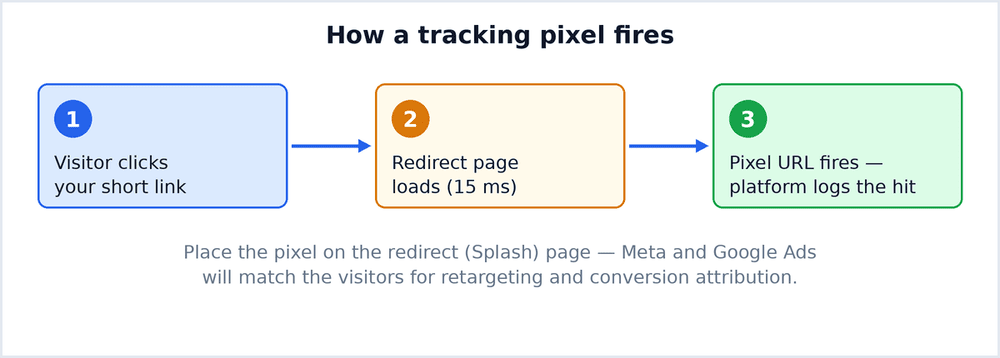
What a Pixel Actually Does
A pixel is a small piece of code that reports an event back to an advertising platform when a page loads or an action occurs.
- It records an event. A page view, a signup, a purchase, whatever you configure.
- It attributes the event. Connecting it back to the campaign or audience that produced it.
- It builds audiences. Platforms use the data to find similar people.
- It enables optimisation. Campaigns improve when the platform knows which clicks converted.
Why Attach Pixels to Short Links
Normally a pixel lives on your own site, so attaching one to a link seems redundant. It is not, for a specific reason: the intermediate step is a real page view you can use.
- It captures audiences before the landing page loads. Useful when the destination is not yours to edit.
- It works on platforms you do not control. Marketplace listings, partner pages, app stores.
- It adds measurement to shared content. Anywhere the link travels but your site does not.
- It lets you retarget link clickers specifically. A narrower and usually better performing audience.
Setting Up the Facebook Pixel
- Find the pixel ID in Events Manager under Data Sources.
- Add the ID to your shortener in the pixel or tracking section, usually per link or per account.
- Create one test link and open it in a browser.
- Open Events Manager and check the Test Events tab. The event should appear within a minute or two.
- Verify the event name and parameters match what you intend to measure before launching anything.
Setting Up Google Ads Conversion Tracking
- Create a conversion action in Google Ads and choose the appropriate category.
- Copy the conversion ID and label. Both are required, and the label is specific to that action.
- Add them to the shortener in the tracking configuration.
- Set the conversion window to match how long your customers actually take to decide.
- Check the status in Google Ads. New conversions show as unverified until data arrives.
Where Setups Commonly Break
- Pasting the full code snippet instead of the ID. Most shorteners want just the identifier.
- Using the wrong label. A Google conversion without the correct label records nothing.
- Testing from your own browser with an ad blocker active. The pixel never fires and you assume it is broken.
- Duplicate pixels from two installations. Events get counted twice and reporting becomes unreliable.
- Expecting instant data. Most platforms take some time to surface events in reporting.
Privacy and Consent
Tracking people without a lawful basis is a compliance issue in many regions, and the requirements have tightened considerably.
- Check whether consent is required for your audience. In much of Europe it is, before any non essential tracking.
- Keep the privacy policy accurate. If you track, say so, and name the platforms involved.
- Respect platform restrictions. Some categories of sensitive data cannot be sent at all.
- Offer a genuine opt out. A banner with no real choice does not meet the standard.
- Review periodically. Requirements change and old configurations drift out of compliance.
Verifying the Data Is Real
- Compare shortener clicks against platform events. They will not match exactly, but a large unexplained gap needs investigating.
- Check for events with no matching campaign. Usually a misconfigured ID sending data to the wrong property.
- Look at the time distribution. Events clustered in one second are usually a test or a bot.
- Confirm on a real device. Desktop testing misses mobile specific failures.
- Re check after any site change. Pixels break quietly when templates are updated.
How Many Events You Actually Need
The temptation is to track everything. In practice a small number of well defined events produces better decisions than a large number of ambiguous ones, because platforms optimise against what you tell them matters. Start with the one action that represents real value, verify it thoroughly, and only add more when you have a specific question that the existing data cannot answer.
Design Events Before Installing Anything
Most pixel problems are design problems that surface during installation. Deciding what to measure first makes the setup straightforward.
- Name the one action that represents success. Everything else is supporting detail.
- Keep event names consistent across platforms. Divergent naming makes later comparison painful.
- Decide what you will do with each event. If nothing, do not collect it.
- Document the mapping. Which platform event corresponds to which site action, written down once.
- Revisit after the first campaign. Real data usually shows one event carrying all the value.
How Often to Look at the Numbers
Checking too often produces decisions based on noise, while checking too rarely wastes what the data can tell you.
- Verify installation once, thoroughly. Then stop watching the raw count.
- Review campaign performance weekly. Short enough to catch problems, long enough to see real patterns.
- Compare like with like. This week against last week, not against a launch spike.
- Write down what changed and when. Without it, every movement looks like a mystery.
- Act on sustained differences only. One unusual day is weather, three in a row is climate.
Keeping Measurement Trustworthy
Measurement is only useful while you believe it, and belief erodes quickly once numbers turn out to be wrong. The habits that protect it are unglamorous: verify every pixel with a real test event before a campaign launches, keep one document listing which ID is installed where, and re run the verification whenever the site or the link template changes. Ten minutes of checking at each change prevents the far more expensive situation of optimising a campaign for months against data that was never recording correctly in the first place.