
Long links are awkward. They break in emails, eat up your character count on social media, look suspicious in SMS messages, and turn into unreadable gibberish when printed. A shortened link solves all of that in seconds. In this guide, you will learn exactly how to shorten a link, when it makes sense to do so, and a handful of practical tips that most people learn the hard way.
What Is a Short Link, Exactly?
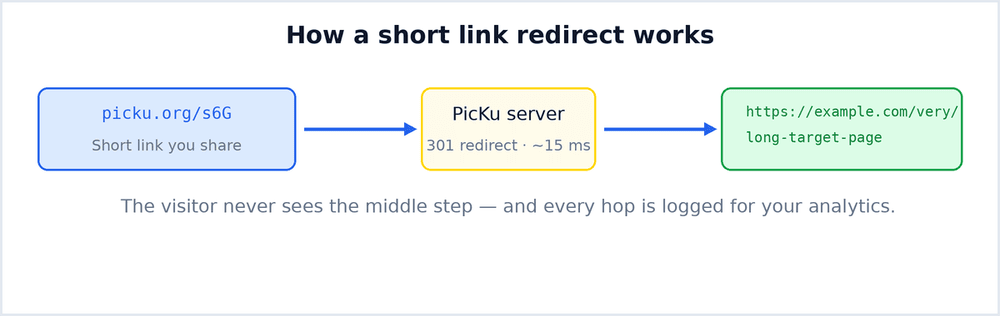
A short link is a compact URL that redirects to a longer destination address. Instead of sharing a 140-character affiliate URL stuffed with tracking parameters, you share something like picku.org/summer-sale. When someone clicks it, a redirect — usually a 301 or 302 — sends them instantly to the real page. The visitor sees nothing in between; the jump typically takes just a few milliseconds.
The short version lives on the shortener's domain, which is why the service you choose matters: the domain appears in every place you share the link, so it should be short, clean, and trustworthy-looking.
How to Shorten a Link in Under 30 Seconds
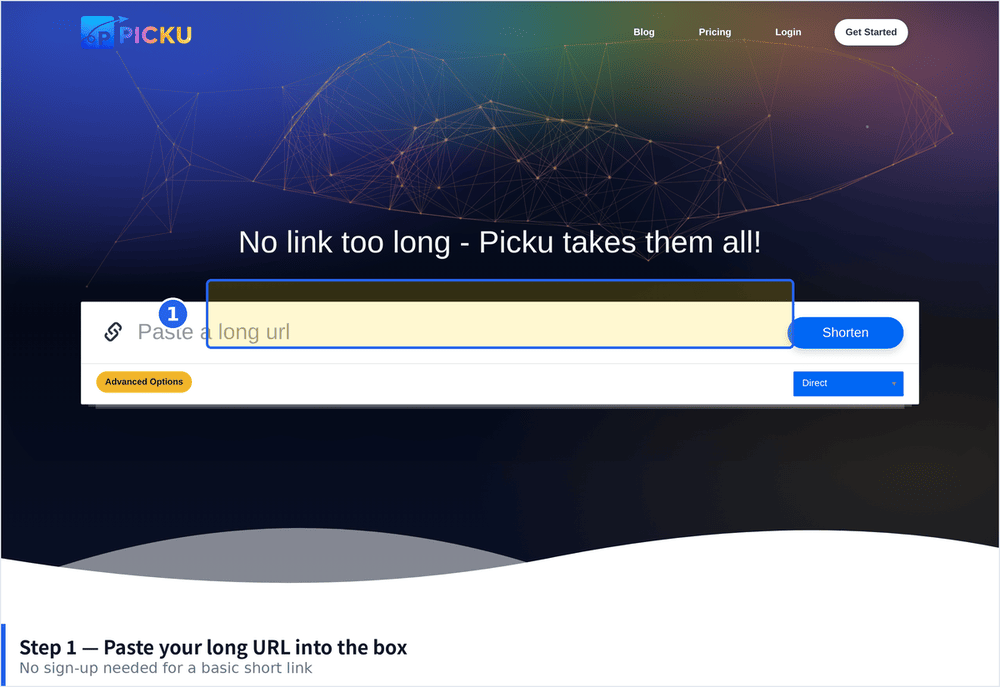
Step 1: Copy the Long URL
Open the page you want to share and copy its full address from the browser's address bar. If the URL contains tracking parameters such as ?utm_source=... or ?ref=..., keep them — a good shortener preserves the full destination.
Step 2: Paste It Into the Shortener
Go to PicKu and paste the link into the shortening field. There is nothing to install and no configuration required for a basic short link.
Step 3: (Optional) Choose a Custom Alias
By default you will get a random code such as /PUe. If you are sharing the link publicly, consider a custom alias like /black-friday. Custom aliases are easier to remember, look more professional, and can meaningfully improve click-through rates because people can see what they are clicking toward.
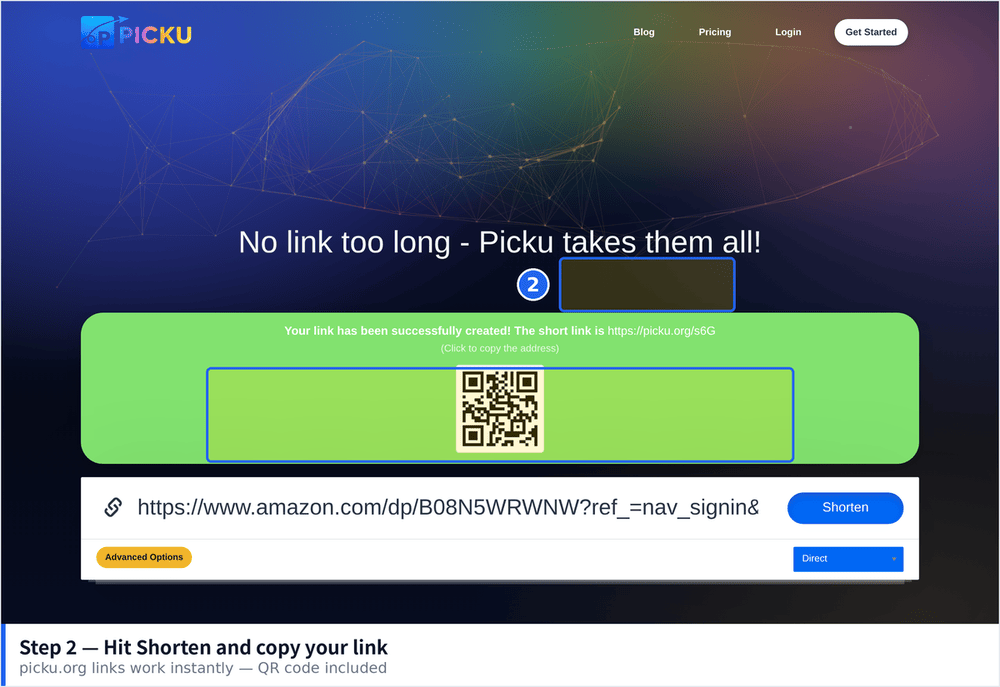
Step 4: Copy and Share
That's it. Copy the short link and use it anywhere — social bios, video descriptions, email newsletters, QR codes on flyers, or SMS campaigns.
When a Short Link Helps (and When It Doesn't)
Short links shine in these situations:
- Character-limited spaces — X/Twitter posts, SMS messages, and app fields with URL length limits.
- Printed materials — nobody types a 90-character URL from a poster; a short link or its QR code is far more usable.
- Speaking out loud — in a podcast or video, "go to picku.org/deal" is sayable; a tracking-parameter monster is not.
- Link tracking — short links let you count clicks on destinations that don't offer analytics of their own.
- Replacing broken links — if a destination URL changes, you can update the redirect without reprinting materials.
On the other hand, avoid disguising links in contexts where transparency matters. If you are sharing something sensitive or if your audience is wary of spam, show the full destination or use a custom alias that makes the destination obvious. Trust is worth more than aesthetics.
7 Practical Tips for Sharing Short Links
1. Use a Custom Alias for Public Campaigns
Random codes like /x7Kp2 look generic. A readable alias such as /podcast-offer signals that the link is intentional and safe.
2. Add UTM Parameters Before Shortening
If you use Google Analytics, build your UTM parameters first, then shorten the final URL. The shortener preserves them, and your analytics reports stay clean. If you are new to this, see our UTM parameters guide.
3. Pair Print Links With QR Codes
Printed short links still require typing. Adding a QR code next to the link lets smartphone users jump straight to the page. Every PicKu link gets a QR code automatically, so this costs you nothing extra.
4. Check Clicks After 48–72 Hours
Most campaign clicks arrive within the first three days. Check your link's statistics after that window to judge performance while the campaign is still running, not after it ends.
5. Don't Shorten Links You Don't Own or Trust
Shortening a URL hides it — for you and for everyone who sees it. Never redirect people to pages you have not verified, and never reuse a short link from someone else without checking where it leads.
6. Use Password Protection for Private Content
Sharing a document with a small group? A password-protected short link keeps the URL convenient while restricting access. PicKu supports this natively.
7. Set Expiration Dates for Time-Sensitive Offers
A link for a 24-hour flash sale should stop working when the sale ends. Expiring links prevent customers from landing on dead pages — and protect you from honoring outdated offers.
Common Beginner Mistakes
- Shortening in the wrong place — build tracking parameters first, shorten last. Doing it backwards strips your analytics.
- Using the same link everywhere — create one short link per channel (email, video, flyer) so you can compare performance instead of guessing.
- Never reviewing links — audit your active links occasionally. Retire what's outdated; update redirects whose destinations have moved.
- Ignoring the domain — the shortener's domain is part of your brand footprint. Pick a service with a clean, reputable domain.
Frequently Asked Questions
Do short links expire?
On PicKu, links stay active unless you set an expiration date or the service is misused, in which case links can be disabled to protect visitors.
Will a short link break my analytics?
No. The redirect happens before the visitor reaches your site, and UTM parameters survive the redirect. Your analytics platform sees the full original URL.
Can I edit the destination later?
With an account, yes — you can update where a short link points, which is one of the biggest advantages over sharing raw URLs in permanent materials like printed brochures.
Are QR codes included?
Yes. Every short link on PicKu automatically comes with a downloadable QR code, useful for packaging, posters, and business cards.
Wrap-Up
Shortening a link takes seconds, but doing it thoughtfully — custom aliases, per-channel links, UTM parameters, QR codes for print — turns a cosmetic trick into a small but genuine marketing advantage. Start with PicKu, try one campaign with two channel-specific links, and compare the click data after a few days. That first A/B insight is usually all it takes to get hooked on proper link management.