
Bitly is still the name most people associate with short links, but it is no longer the automatic choice it once was. Over the past few years the free plan has lost features, branded link allowances have tightened, and teams that used to treat Bitly as infrastructure have started to price up the alternatives. If you are reading this, you have probably hit one of those limits yourself.
The good news is that the market around short links has matured. There are now credible tools built for branded domains, for analytics depth, for developer workflows, and for people who simply want a short link that works. This guide compares seven of them and explains which type of user each one actually suits.
Why Teams Start Looking Elsewhere
The triggers tend to be surprisingly consistent across companies of every size.
- Branded domain limits. Free and entry plans usually cap how many links you can create on your own domain, which becomes a problem the moment link building becomes a habit rather than an experiment.
- Analytics retention. Several platforms only keep detailed click data for a limited window on lower tiers, so historical comparison becomes impossible after a few months.
- Per-seat pricing. When a link tool charges per user, a marketing team of fifteen pays a multiple of what a single founder would pay for identical functionality.
- Feature gating. QR codes, link expiration, password protection and custom landing pages are frequently reserved for higher plans even though the underlying cost to provide them is minimal.
What to Evaluate Before Switching
- Custom domain support and the SSL certificate that goes with it. A short domain without HTTPS is worse than no short domain at all.
- Click data granularity. Check whether you get referrer, device, country and time-of-day breakdowns, not just a total count.
- Link editing after publication. The ability to change a destination without creating a new short URL saves you when a campaign target moves.
- Team and workspace permissions. Needed the moment more than one person touches the account.
- Export and API access. If you cannot get your data out, you are locked in.
- Redirection type. A 301 redirect passes ranking signals and is cached aggressively; a 302 is easier to change later. You want at least the option to choose.
- Uptime history. A short link that goes down takes every link you have ever shared down with it.
The Shortlist
Rebrandly
Built almost entirely around branded links, Rebrandly treats the custom domain as the product rather than an upsell. The editor is clean, the analytics are solid, and link editing after publication works well. Pricing sits above the budget end of the market, which is the main objection. It suits companies whose brand recognition on links matters more than saving a few dollars a month.
Short.io
A balanced option that covers branded domains, geo and device targeting, and reasonably deep analytics without enterprise pricing. The learning curve is gentle and the API is well documented. It is a sensible default for small marketing teams that expect to grow into advanced features rather than needing them on day one.
TinyURL
The longest running service on this list and still the fastest way to shorten a link with no account at all. Recent versions added custom domains and basic analytics. It is not a campaign management platform, and it does not try to be. For occasional personal use, it remains hard to beat for simplicity.
BL.INK
Positioned at the enterprise end with workspaces, role based permissions, and integration options that larger organisations ask for. The interface assumes you already know why you need link governance. If you are a solo operator, much of it will feel like overhead.
Dub
An open source option that appeals to developers who want to self host or read the source before trusting it. The analytics dashboard is modern and the API first design fits automated workflows. Self hosting means you own the uptime problem, which is the trade for full control.
T2M
Aims at volume users with bulk creation, password protection and expiration on every tier. The interface is less polished than the design focused tools, but the raw feature to price ratio is strong for anyone managing thousands of links.
PicKu
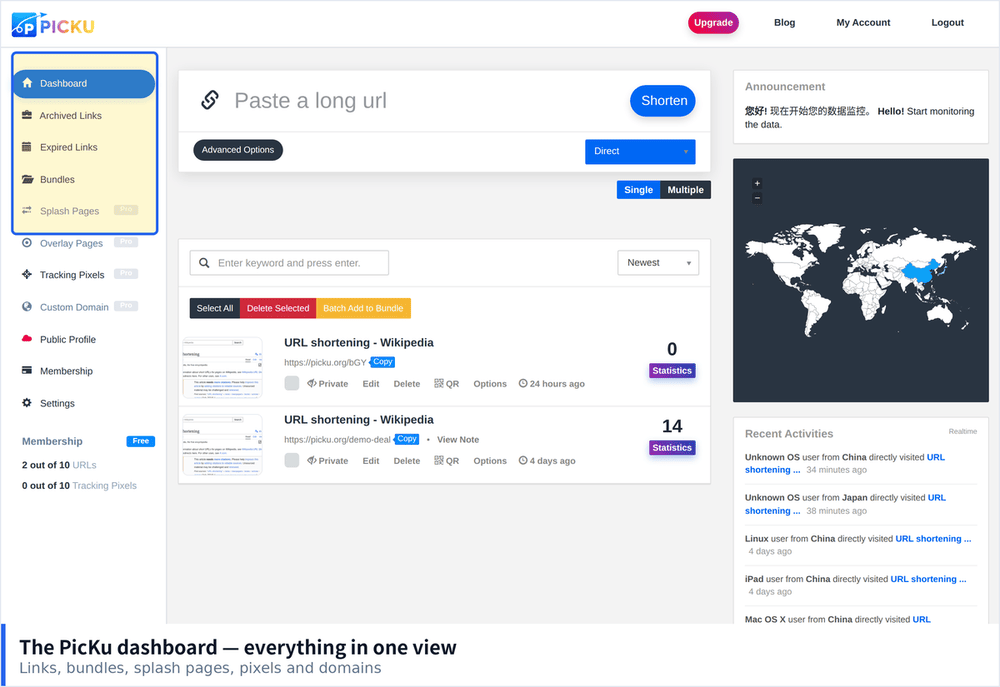
PicKu covers the core set that most people actually use: custom domains with automatic HTTPS, per link click analytics with country and device breakdowns, password protection, expiration dates, QR codes and editable destinations. It is aimed at individuals and small teams who want the useful features without a per seat contract. Links created on a free account stay working, which matters when you are evaluating a tool before committing.
Which One Fits Your Situation
- Solo creator or small site owner. Start with the free tier of PicKu or Short.io. Both give you a branded domain without a large upfront commitment.
- Marketing team running paid campaigns. Prioritise analytics depth and editing after publication. Short.io or Rebrandly fit well here.
- Agency managing many clients. Workspace separation is the deciding factor. Rebrandly or BL.INK.
- Developer with automation needs. API quality and self hosting options matter most. Dub or Short.io.
- Enterprise with compliance review. BL.INK, or a self hosted Dub instance behind your own domain.
Moving Without Breaking Existing Links
The fear that stops most teams from switching is the library of links already out in the world. A few habits make migration far less painful.
- Export everything first. Pull a full list of short codes and destinations from the old platform before you cancel anything.
- Recreate the high traffic links first. You do not need to migrate ten thousand links on day one. Start with the two hundred that generate real clicks.
- Keep the old account alive for a transition period. Run both in parallel for a month so nothing 404s while you verify the new setup.
- Use the same short codes where possible. Some platforms let you pick the slug, which means the URL people already have keeps working.
- Check a sample manually. Click twenty migrated links yourself and confirm they land in the right place with the right redirect type.
Choosing Based on the Next Two Years, Not the Next Two Weeks
The most expensive mistake in this category is picking a tool that fits today and becomes a constraint in eighteen months. Before committing, ask three questions: can I export every link and its click history, can I use my own domain rather than a shared one, and does the price scale with my usage or with my headcount. Tools that answer well on all three tend to be the ones people stay with. Tools that fail on any of them are the ones you will be migrating away from later, which is exactly the work this guide is meant to help you avoid doing twice.
Quick comparison — feature availability as of October 2026 (plans change often; verify with each provider before deciding):
| Tool | Free links | Custom alias (free) | Full analytics (free) | QR codes | Password / expiry | Custom domain |
|---|---|---|---|---|---|---|
| Bitly | Very limited | Paid | Limited window | Limited | Paid | Paid |
| Rebrandly | Limited | Yes | Limited window | Yes | Paid | Paid |
| Short.io | Limited | Yes | Basic | Yes | Paid | Paid |
| TinyURL | Generous | Yes | Basic only | Yes | Paid | Paid |
| BL.INK | Limited | Yes | Limited window | Yes | Paid | Paid |
| Dub | Generous | Yes | Yes | Yes | Yes | Paid |
| PicKu | 10 links | Yes | Yes — full, unlimited time | Yes — automatic | Yes — free | Yes (VIP) |