
Click counts are the most available number in link analytics and the least useful one on its own. A link with two hundred clicks sounds successful until you notice that every visit lasted three seconds, or that ninety percent came from a single source that will not repeat. Reading link data properly means asking what the numbers are actually measuring.
The Metrics Worth Looking At
- Total clicks. Raw volume. Useful as a rough signal, misleading as a goal.
- Unique visitors. Distinguishes one person refreshing from twenty people arriving.
- Referrer. Shows where the click happened, which tells you which channel deserves more attention.
- Device type. Mobile heavy traffic means the destination must work on a phone.
- Country. Catches campaigns that reached the wrong region before the budget is spent.
- Time distribution. A spike shows a campaign launch, a steady trickle shows evergreen placement.
Reading Click Patterns
The shape of the data over time usually tells you more than the total.
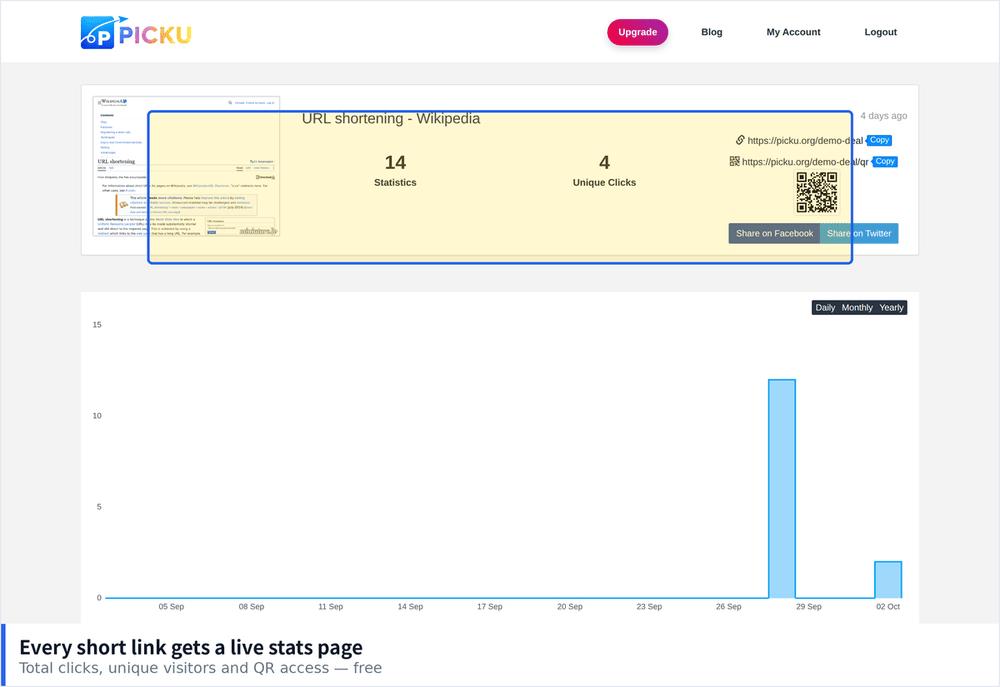
- A sharp spike then silence. Typical of a social post or newsletter. Judge it on the spike, not what follows.
- Steady low volume. Usually a link in an evergreen place such as a profile or documentation.
- Repeated daily bumps. Suggests the link is being shared in a recurring context, which is worth identifying and supporting.
- Sudden traffic from an unexpected referrer. Someone shared it somewhere you did not anticipate, which is often the most interesting thing in the report.
Common Misreadings
- Assuming clicks equal interest. A click is a very low commitment. What happens after matters far more.
- Ignoring bots. Automated previews from messaging apps and crawlers inflate counts, particularly in the first hours.
- Comparing links with different placements. A link in an email and a link in a bio have completely different baselines.
- Judging too early. A day of data on a link intended to run for a month will give the wrong answer.
- Forgetting your own clicks. Testing the link yourself adds to the count, which matters when volumes are small.
Connecting Link Data to Outcomes
Link analytics tell you about the journey before someone reaches your site. To know whether a link was valuable, you need to connect it to what happened next.
- Tag links consistently. Parameters let your analytics platform attribute sessions to the right campaign.
- Watch bounce rate per link. Two links with equal clicks but very different bounce rates are not performing equally.
- Check conversion by source. The channel that sends the fewest visitors sometimes converts the best.
- Keep a record of where each link was placed. Without it, the numbers have no context months later.
Using Data to Make Decisions
The point of measurement is choosing what to do next. A few simple rules keep it practical.
- Double down on placements with sustained traffic. Recurring clicks indicate a location worth maintaining.
- Fix or retire links with high clicks and immediate exits. Usually a mismatch between expectation and destination.
- Test one variable at a time. Change the placement, wording or destination, never several at once.
- Review on a schedule. Monthly is enough for most people and prevents data from being collected and ignored.
How Much Detail You Actually Need
It is easy to over invest here. For most links, three questions cover nearly every decision: how many people came, where they came from, and whether they stayed. Anything beyond that is useful only if you are running paid campaigns or comparing several channels against each other. The failure mode to avoid is collecting detailed data and never acting on it, which costs the same effort as doing it properly and returns nothing.
Segmenting by Device and Location
Two breakdowns consistently change decisions, and both are available in most link analytics without any extra setup.
- Device split. If ninety percent of clicks are mobile and the destination is difficult to use on a phone, fixing the page is worth more than any change to the link itself.
- Country split. Traffic from an unexpected region usually means the link was shared somewhere you did not plan for, or that a campaign setting is wrong.
- Compare the two together. Mobile heavy traffic from one country often points to a single placement that deserves more attention.
- Watch for sudden geographic shifts. A link that was mostly local and becomes international has usually been picked up somewhere new.
Setting Realistic Benchmarks
Without a baseline, every number looks either good or bad for no reason. A few reference points help.
- Email links convert far higher than social links. Comparing them directly will mislead you every time.
- Profile and bio links produce steady but low volume. Do not judge them against a campaign spike.
- A click through rate that drops over weeks is normal. Audiences tire of the same placement, which is an argument for rotating destinations.
- Track your own history rather than industry averages. Your past performance is the only benchmark that reflects your actual audience.
Building a Review Habit
The difference between people who get value from link analytics and people who do not is rarely the tool. It is whether someone looks at the numbers on a predictable schedule and writes down what changed. Set a recurring reminder, spend ten minutes comparing the current period against the previous one, and note anything that moved significantly. That small habit turns a dashboard into something that actually influences which links you keep, which campaigns you repeat, and which placements you quietly stop bothering with.