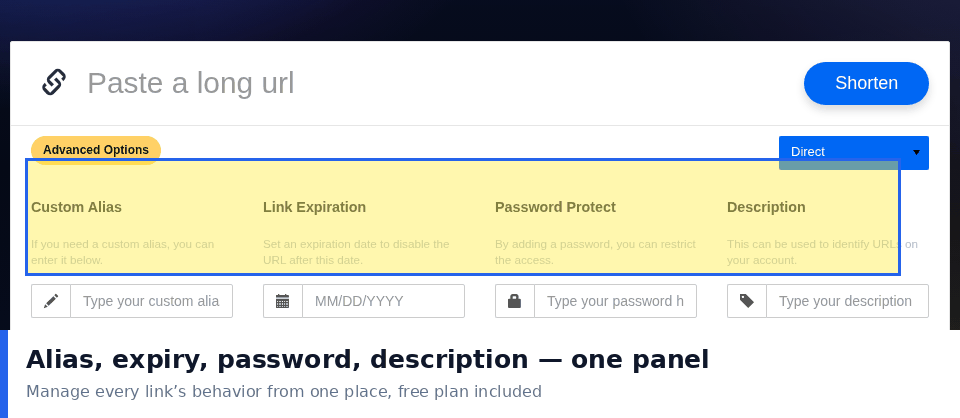
Most people treat links as disposable: create one, paste it somewhere, forget it forever. Then the brochure goes to print with a dead URL, the video description points to a moved page, and nobody remembers which short link was used in which campaign. Link management — boring as it sounds — is the difference between a pile of URLs and a small, reliable marketing asset. Here is a practical system that works for solo creators and small teams without any special tools.
Why Links Deserve Real Management
Links are the connective tissue of everything you publish. They appear in permanent places — printed materials, video descriptions, podcast show notes, email signatures — where a broken or outdated link keeps costing you visitors for months. Unlike a social post, a printed link cannot be edited after publication. The only protection is managing the redirect, and you can only do that if you know which link is where.
Naming Conventions: The One Habit That Pays for Everything
If you adopt a single practice from this article, make it this: give every link a readable, structured custom alias. Random codes like /x7Kp2 are fine for throwaway links, but permanent and campaign links deserve names you can recognize at a glance.
A simple, flexible pattern:
- Campaign links: /sale2026-email, /sale2026-video, /sale2026-bio — one per channel, campaign prefix shared.
- Evergreen links: /start-here, /newsletter, /discord — destination-focused names that rarely change.
- Personal shortcuts: /my-resume, /my-shop — memorable enough to say out loud.
Six months from now, "which link was in the spring email?" should be answerable in five seconds. With structured aliases, it is.
Organize Links Into Two Buckets, Not Fifty
Elaborate folder systems collapse under their own weight. Two buckets are enough:
- Active: links currently in circulation. These get regular click reviews and accurate destinations.
- Archived: links from finished campaigns. Stop promoting them, but keep the redirects working — old printed materials and indexed pages still send traffic, and a 404 here burns trust.
Review the active bucket weekly; sweep the archive quarterly. That's the whole maintenance model.
Auditing: A 20-Minute Quarterly Ritual
Once a quarter, walk through your active links and ask four questions of each:
- Does the destination still exist and say what it said? Pages move, products get retired, prices change.
- Is it getting clicks? A link with zero clicks for 90 days is either misplaced or the placement is dead. Fix the placement or retire the link.
- Is the alias still accurate? /free-trial that now leads to a paid page is a trust problem waiting to happen.
- Does it need protection? Private documents should be password-protected; time-sensitive offers should have expiration dates.
Twenty minutes per quarter prevents the two classic disasters: printed dead links and quietly outdated offers.
Security Practices That Take Minutes, Not Hours
Password-Protect Private Links
Internal documents, client drafts, family photo albums — anything not meant for the public should sit behind a password. A short link's convenience should never become an access-control hole. PicKu's password-protected links make this a one-click step.
Set Expiration Dates on Time-Bounded Offers
A link for a launch-week discount should die with the launch week. Expiring links protect visitors from stale offers and protect you from honoring them by accident. See how link expiration works in practice.
Never Shorten What You Haven't Verified
Shortening hides the destination — from your audience and from you. Before you distribute a link, click it yourself in a fresh browser window and confirm where it lands. And be cautious about re-sharing short links created by strangers: you are vouching for an address you cannot see.
Keep One Link per Channel
Beyond analytics benefits (see our click analytics guide), one link per channel is containment: if one placement gets picked up somewhere unexpected, you can measure and manage it independently instead of disturbing every channel at once.
Working With a Team: Three Light Rules
- One owner per link. Whoever created a campaign's links is responsible for auditing them. Shared responsibility becomes no responsibility.
- Aliases are first-come, first-served — so claim campaign prefixes early. Decide /sale2026-* before three people invent three different prefixes.
- Document destinations outside the shortener. A simple sheet mapping alias → destination → placement → owner means any teammate can audit any link without guessing.
QR Codes Are Part of Link Management Too
Printed QR codes are links with an extra failure mode: nobody can hover over a poster to preview the destination. That makes management discipline more important, not less. Point print QR codes at dedicated short links (never at raw tracking URLs that might change), and test them with two different phones before anything goes to print. Every PicKu link includes an automatically generated QR code, so your print and digital versions always stay in sync.
Frequently Asked Questions
How many short links is "too many"?
There is no hard limit, but if you cannot name what a link is for from its alias alone, you have crossed into unmanaged territory. Structured naming keeps hundreds of links navigable.
Should I delete old campaign links?
Prefer archiving over deleting. Finished campaigns still receive residual traffic from search engines and saved materials; a redirect to a relevant page preserves that value, while a 404 wastes it.
What's the best alias length?
Short enough to type after hearing it aloud, long enough to be unambiguous — usually 8 to 20 characters. /spring-sale beats both /s1 and /our-amazing-spring-sale-campaign-2026.
Can I change a link's destination later?
Yes, with an account you can update the redirect. This is precisely why managed short links beat raw URLs in permanent materials: the printed link can outlive any number of website redesigns.
Wrap-Up
Good link management is just a naming convention, two buckets, and twenty minutes a quarter. Set up your aliases with a structure you can recognize at a glance, protect anything private, expire anything temporary, and give every active link a weekly glance. PicKu supports custom aliases, password protection, expiration dates, and automatic QR codes — everything this system needs. Your future self, reprinting that brochure next year, will be glad you spent the twenty minutes.